Google Analytics is widely used as the default reporting layer for websites, lead generation funnels and ecommerce journeys. That makes it useful, but it also means many teams assume that recorded conversions represent the full picture. We’ve never seen a standard Google Analytics installation which had a perfect 100% account record of conversions and attribution.
This article explains how Google Analytics can miss conversions, where the gaps usually come from and how to separate setup issues from platform limitations. It also gives you the practical advice from our years of consulting: if conversion events are correctly implemented, a meaningful share of missing conversions are lost due to blocked analytics, session handling limitations and attribution loss.
Common Causes 
Missing conversions usually come from one or more of these areas:
- Google Analytics is blocked before it can load
- Sessions are split, reset or attributed imperfectly
- Campaign and click data is lost before conversion
- Cross-domain or external checkout journeys break continuity
- Conversion events are configured incorrectly or not sent reliably
- Consent choices prevent tracking in standard implementations
When assessing what the issue could be the first thing we check for is the implementation before moving onto other issues. We do this because bad implementation can seriously impact conversion tracking but are also easy to diagnose, fix and recover from.
Other issues are more complex and can require enhanced software such as Truly Analytics to handle.
Google Analytics is Blocked 
This is the most obvious reason and often the most common one depending on your audience.
Google Analytics depends on requests reaching Google’s infrastructure. If those requests are blocked by browser protections, ad blockers, DNS filtering, privacy tooling, corporate network rules, VPN filtering or hardened browser settings, page views and events may never be recorded. When that happens, the conversion itself may still occur, but Google Analytics has no record of the session that led to it.
Even worse than this, some poor implementations can prevent the conversion itself if Google Analytics is blocked. If you’ve ever had customers saying that they “couldn’t” check out, you might need your GA implementation checked.
You’ll find this problem across audiences that are more likely to block tracking by default, including:
- technical users
- cybersecurity audiences
- enterprise users on managed networks
- privacy-conscious visitors
- users on restricted government, finance or corporate systems
For these audiences, the gap can be material rather than marginal. Additionally you’ll find certain demographics that will block analytics and tracking for personal reasons:
- millenials including millenial parents who blocking adverts across the network and child devices
- traditional executives with personal devices serviced by VIP tech support
- technical recreation such as gamers, home cinema, audiophiles
- affluent professionals such as consultants, start up execs, specialist contractors
Session handling is not always as complete as it appears 
Google Analytics reports conversions within a session model, but that model is not the same as full session control.
In practice, sessions can be mishandled or fragmented in several ways:
Session Timeouts
Google Analytics uses defined session rules rather than a fully controlled first-party record of every interaction. A session can be identified as a new session if there’s a period of inactivity. This defaults to 30 minutes but can go up to just under 8 hours. That means an attribution last thing at night will not contribute to a conversion in the morning.
The conversion may still be recorded, but the attribution context can be weakened, overwritten or reassigned. You should still have your conversion but in this case it would seem like someone navigated straight to checkout.
Source changes during the journey
A user may arrive through one source, then return through another or trigger a new session through a route that changes how the visit is classified. This can alter the reported origin of the conversion even if the first touch was the meaningful driver.
Examples include:
- email click followed by direct return
- paid social click followed by branded search
- referral traffic followed by bookmark revisit
- campaign visit interrupted by biscuit loss or browser reset
- closing and reopening a tab
Google Analytics can model these paths, but it does not guarantee a perfect one-to-one preservation of the original inbound context across the full journey.
Session breaks caused by implementation or browser conditions
Sessions may split because of:
- missing or inconsistent tagging
- redirects stripping campaign parameters
- consent tooling delaying analytics loading
- single-page application tracking issues
- browser storage restrictions
- cross-subdomain or cross-domain misconfiguration
When that happens, the conversion may appear detached from the real entry point. You need to ensure that your internal linking is clean throughout your site.
Lost UTM parameters
Campaign values such as source, medium, campaign name and campaign ID can be easily dropped before hitting your page or before Google Analytics can capture them. Unfortunately Google Analytics does not tie UTM parameters directly to an event as these parameters are treated as special signals just for Google’s PPC services.
Non-Google traffic can be tracked but external traffic sources require more handling. Additionally, even Google tracking needs to feed through Google’s PPC platforms before it becomes fully quantified in Google Analytics.
External checkout and cross-domain journeys
Finally, non-standard navigation during customer journeys is an easy fall off point for conversion and attribution tracking. This often happens when:
- the checkout is on another domain such as Stripe
- payment steps move through third-party providers
- booking systems sit outside the main website
- forms are embedded from external platforms
- ecommerce flows cross subdomains without proper linking
If cross-domain measurement is not configured correctly, Google Analytics will lose continuity between the original visit and the purchase. This can have effects such as the purchase event being recorded but unattributed and with no prior session data.
This is mistaken for weak campaign performance when the real problem is that the journey broke mid navigation.
How to diagnose & fix 
Check that purchase, lead, form and other conversion events are implemented with the correct event names and parameters. Test across devices, browsers and journey types.
We’re making sure that there’s no silly mistakes but also that the actual journey is standardised and can therefore be reflected in the reports. There needs to be a single definition of what events are conversions, which are key events and which should be documented and tracked in your reporting.
Review whether users cross domains, subdomains, payment providers, embedded forms or booking systems before conversion. If users have to cross one of these thresholds make sure that their onboarding back onto your systems have something to continue to journey tracking.
Additionally, ensure that your internal linking does not hold any campaign tracking. Campaign tracking should be on external traffic coming inbound, not on internal linking.
Test what happens when users decline consent, partially consent or interact before analytics loads.
In a standard Google Analytics implementation consent needs to be fully provided before Google will provide analytics coverage. As an analytics product for an advertising platform Google needs to obtain full consent before analytics can operate hence no consent at all hamstrings Google Analytics installations. This will break your tracking and attribution.
Blocking Google is becoming a way of life. If your audience doesn’t want Google in their lives then you’ll need a privacy defending product like Truly Analytics to protect your users from being unmasked whilst retaining important analytics activity.
First Party Attribution 
A central advantage of Truly Analytics is First Party Attribution.
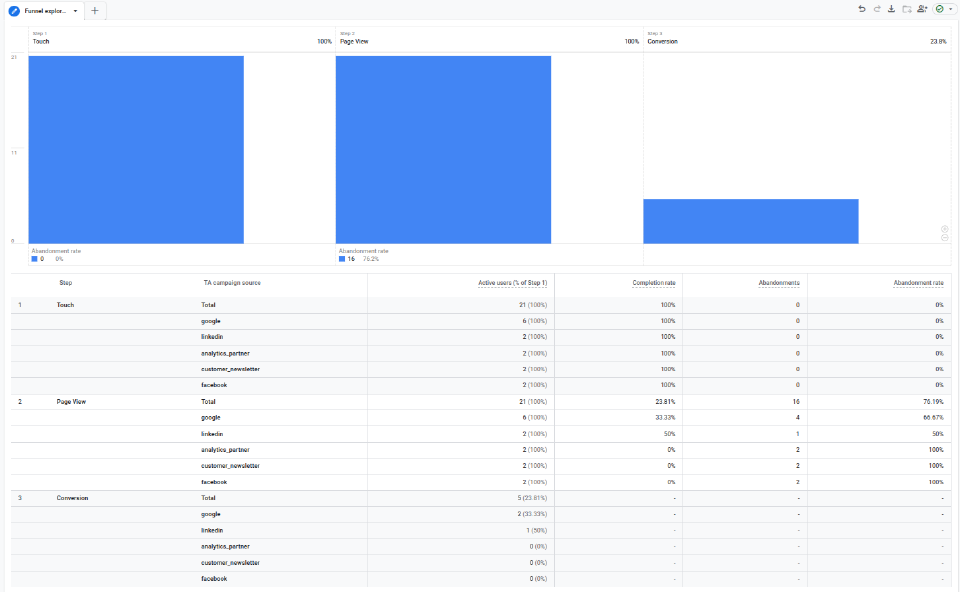
This is a reimplementation of attribution tracking into Google Analytics that provides reliable and logically sound campaign data management that persists regardless of sessions.
Instead of relying on Google’s automated ad platforms to sort your attribution and conversions Truly Analytics creates an inspectable first-party record of observed attribution including:
- campaign names
- campaign IDs
- sources
- mediums
First Party Attribution is then connected and tied to page views, landing page activity, scroll depth, downloads, form submissions, key events and purchases showing up directly in your reports.
Conclusion 
Google Analytics misses conversions for several practical reasons. Some are implementation errors, such as broken event tagging or cross-domain setup. Others are structural, including blocked analytics, session fragmentation, lost campaign context and consent-based collection limits.
Google Analytics is still usable but has glaring gaps in it’s functionality. A standard Google Analytics installation without support does not provide a complete record of real user behaviour, especially for audiences that are more likely to block tracking or move through complex journeys.
If your purchase and conversion events are correctly tagged and tested, but reported numbers still appear low, the missing data is likely elsewhere in the collection chain.
You should check out the Truly Analytics trial to get an idea of the traffic your installation is missing.
- Start a Truly Analytics trial
- View the Truly Analytics product overview
- Learn more about First Party Attribution
Start your free trial
No obligation, free 3-day trial that runs alongside your current Google Analytics setup